Xtream Codes vs M3U in One Minute
Xtream codes vs M3U comes down to how your player gets your channel list. An M3U setup uses one web address (a URL) that points to a playlist. An Xtream-style setup uses a few separate details, usually a server address, a username and a password, and lets the app fetch the list for you. MediaLen.tv works with any IPTV player that supports M3U or Xtream credentials, so you can choose whichever your app handles better.
If you want the short version: use whichever option your player makes easiest. Both lead to the same place, a list of live channels and on-demand titles inside the app.
What an M3U Playlist Is
An M3U playlist is a plain text file, or a link that returns one. Each entry is a line pointing to a stream. Playlist files in general are line-based text, and each line is a URI, is blank, or starts with the character #, according to the HTTP Live Streaming specification. Our explainer on what an M3U file is goes deeper.
For you, the practical meaning is simple: one link carries the whole list. You paste it into a player, the player reads it, and the channels appear.
- It suits quick setup, players that only ask for a playlist link, and moving the same list between apps.
- Long links are easy to mistype, and apps that load the whole list at once can feel slow on weaker devices.
MediaLen.tv says your M3U URL is always available in My Accounts.
What Xtream Credentials Are
Xtream credentials are a set of login details instead of one link. Most players that support them ask for three things: a server address, a username and a password. The app uses those details to request your channels, categories and, where supported, extras like a TV guide.
Think of M3U as handing the app a finished list, and Xtream credentials as giving the app a key so it can ask for the list itself.
- The short fields are easier to type with a TV remote, and apps often sort channels and on-demand titles into tidy sections.
- A typo in any one field stops the login, and not every app labels the fields the same way.
Side-by-Side Comparison
| M3U URL | Xtream credentials | |
|---|---|---|
| What you enter | One link | Server address, username, password |
| Typing effort | One long string | Three shorter fields |
| Best when | The app asks for a playlist link | The app has a login-style screen |
| Common slip | Missing part of the link | Wrong character in a field |
Neither is better in every case. The right pick is the one your player supports cleanly.
How to Choose for Your Player
Start with what your app offers. Open the add-playlist or add-account area and see what it asks for. Labels vary by app version, so the wording on your screen may differ from any guide.
- Open your player and look for an option to add a playlist, a source or an account.
- If it offers a login with server, username and password, try that first. You will know it worked when your channel categories load.
- If it only accepts a link, look for an option to add an M3U URL and paste the link from My Accounts. You will know it worked when the channel list fills in.
- If one method fails, try the other in the same app. A list that loads confirms the details were right.
Copy and paste where you can instead of typing, and check for stray spaces at the start or end.
Device Notes
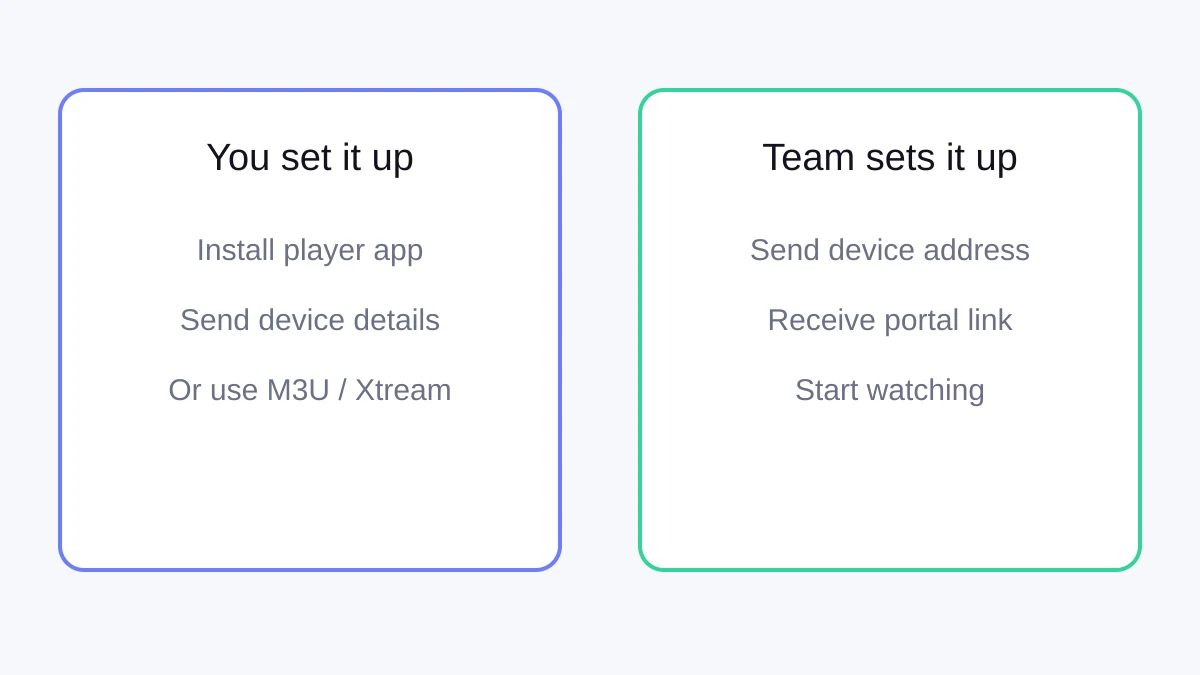
On Amazon Fire Stick, Android TV, iPhone / iPad and Smart TV (Samsung/LG), MediaLen.tv setup uses IBO Player: you install it, then send us the MAC Address and Device Key. Our Firestick setup guide walks through that route.
For MAG Box, the MediaLen.tv team sets things up. You send the device MAC address through the WhatsApp chat or by email, and after payment is confirmed we send your portal link. Roku is also set up by the team.
If you prefer a different player, the M3U or Xtream route above applies. Not sure which device suits you? See our guide to the best streaming devices.
If Your List Will Not Load
Check the basics first: the link or fields match exactly, the device is online, and the app is up to date. If channels load but playback stutters, our IPTV buffering fix covers what to check next.
If the problem happens on every device and every network, contact support. Use the WhatsApp chat (the Live Chat button on the site) or email support@medialen.tv.
Choosing a Service That Fits
When you compare providers, ask which sign-in methods they support and whether you can use your own player. Our checklist for how to choose an IPTV service covers that, and IPTV meaning is a good primer if the terms are new.
MediaLen.tv supports both M3U and Xtream credentials, with live channels and on-demand titles in one place. You can see options on our plans page, where prices depend on plan length and device count, or read more about an IPTV subscription. The lowest monthly rate is $5.00 per month, which is the 1 device rate on the longest plan, at $59.99 total for 1 device.
Reviewed by Nour-eddine, who runs MediaLen.tv.
Frequently asked questions
Can I use both Xtream credentials and an M3U URL?
You can use either one in a player that supports both, but you only need one per player. Pick the method that your app handles best and keep the other as a backup.
Where do I find my M3U URL?
MediaLen.tv says your M3U URL is always available in My Accounts. If you cannot find it, contact support through the WhatsApp chat (the Live Chat button on the site) or at support@medialen.tv.
Does MediaLen.tv work with players other than IBO Player?
Yes. MediaLen.tv works with any IPTV player that supports M3U or Xtream credentials, not only IBO Player. If you already use a player you like, you can keep using it.
Do I need either method on a MAG Box or Roku?
No. For MAG Box and Roku the MediaLen.tv team handles the setup. For a MAG Box you send us the device MAC address by WhatsApp chat or email, and we send a portal link once payment is confirmed.
What if the playlist loads on one device but not another?
Check that the URL or credentials were typed exactly, with no extra spaces. If the problem happens on every device and every network, contact support through the WhatsApp chat or at support@medialen.tv.