How IPTV on an Android TV Box Works
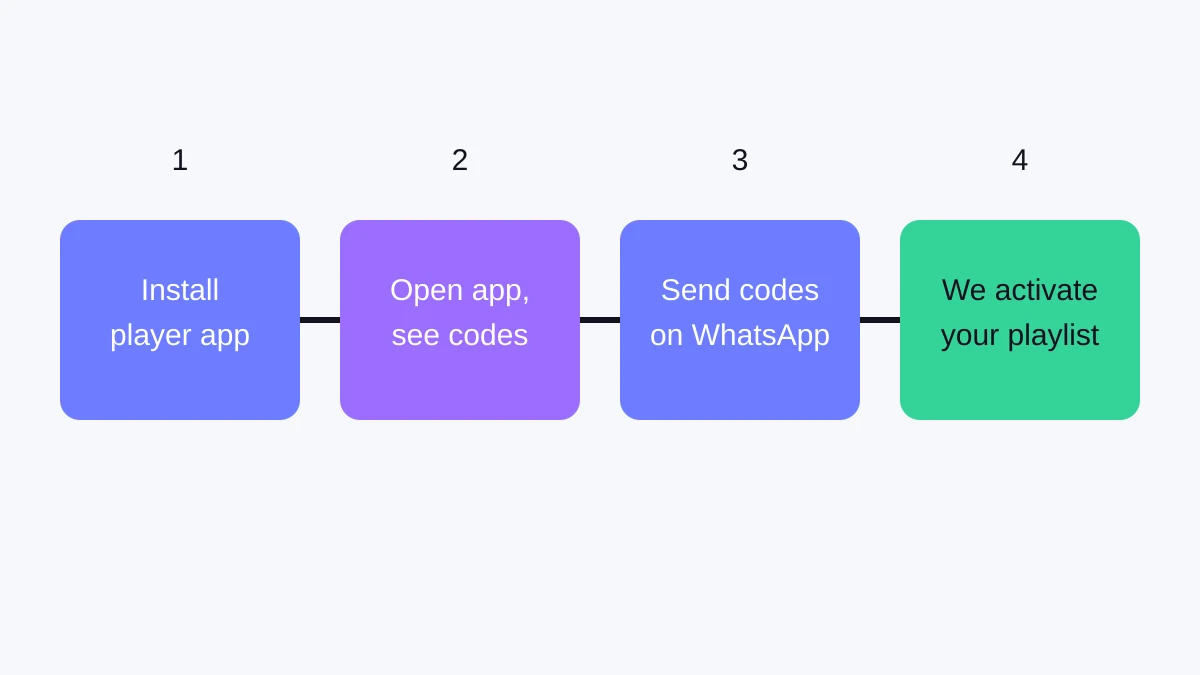
Setting up iptv on android tv box hardware comes down to a few steps: you install an IPTV player app from the store, open it to see its MAC Address and Device Key, and send both to your provider. For MediaLen.tv, our team then activates your playlist on that app. You do not need extra hardware or a cable run. The box only needs a working internet connection and a TV with an HDMI port.
If you are still choosing hardware, our post on the best streaming devices compares the common options. This guide assumes you already have an Android TV or Google TV box plugged in and signed in.
What You Need Before You Start
You need four things: the box connected to your TV, a working internet connection, access to the store on the box, and a way to message us. Check each one before you begin, because most setup delays come from one of these.
- A box that runs Android TV or Google TV, already set up on your TV.
- A Wi-Fi or Ethernet connection.
- A store account signed in on the box, so you can install apps.
- WhatsApp or email, to send us two codes.
If you want a broader overview first, read what IPTV means and how an IPTV subscription fits together.
Install a Player App From the Store
A player app is the program that plays your channels, and you get it from the store on your box. MediaLen.tv works with any IPTV player that supports M3U or Xtream credentials, not only one app. We recommend IBO Player, so the steps below use it.
On a Google TV home screen, Google's help page describes two ways to find an app:
- Search: press the Assistant button on your remote or select Search on the home screen, say or type the app name, and when its page appears select Install.
- Browse: scroll to the Apps tab at the top of the home screen, pick a category, choose the app, and follow the on-screen instructions.
Those steps come from Google's guide to installing apps on Google TV. On an Android TV box, you open the Play Store from the home screen, search for IBO Player and select Install. You know it worked when the app appears in your apps row. Screens vary by device and software version.
Google also notes a tip: if you have trouble with a purchase, try a different payment method, such as a credit card or PayPal. IBO Player itself is not something we ask you to buy through us, so this only matters if the store asks for payment.
Activate MediaLen.tv With Your MAC Address and Device Key
Activation links your box to your playlist, and it takes two codes that the player shows you. Open IBO Player. You will see a MAC Address and a Device Key on screen. Send both to us on WhatsApp. The site's Live Chat button opens that same WhatsApp chat. Our team will then activate your playlist, with no further setup needed on your end.
Activation usually takes a few minutes for card payments. Crypto and manual payments are confirmed by our team.
You can tell it worked when your channels and on-demand library load in the app after we confirm. If you want to compare plan lengths first, see the plans page. The lowest advertised rate is $5.00 per month, which is the 1 device, 1 year plan at $59.99 for 1 device. Prices change with plan length and with how many devices (1 to 4) you stream on at once.
A few habits save time:
- Copy the codes exactly as shown, or take a clear photo of the screen.
- Send both codes in one message.
- Keep the app installed. Removing it can change what the screen shows.
If you prefer a different player, your M3U URL is always available in My Accounts. Our explainer on what an M3U file is covers what that link does.
If Playback Stutters on Your Box
Stutter usually has a few causes you can check in a few minutes, starting with the connection. Android's help page lists steps for problems playing videos on Android TV, and several apply here. Menu names can vary by device and software version.
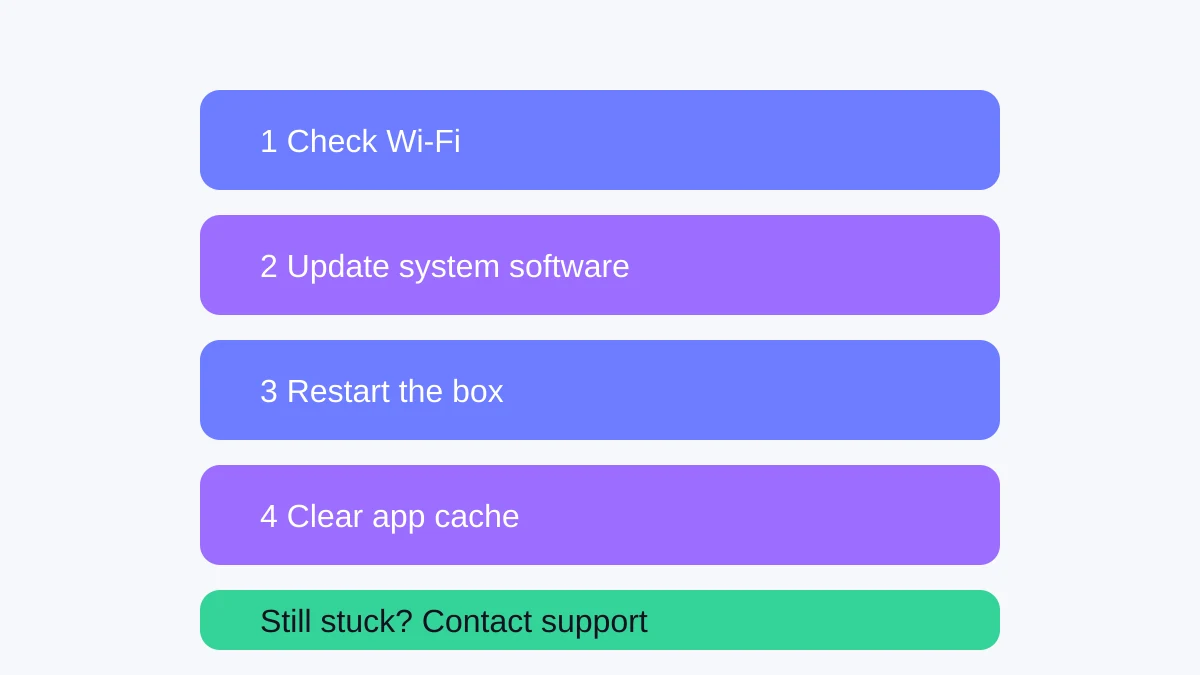
Check the connection and the system
- Check your Wi-Fi: on the Android TV Home screen go to Settings, and under Device select Wi-Fi. Select a network and follow the on-screen instructions, then play again.
- Update the system: go to Settings, then About, then System software update, and install any available updates.
- Restart the box: go to Settings, then About, then Restart. Play again once it restarts.
- Clear the app cache: go to Settings, then Apps, and under System apps select the app, then Clear cache.
These come from Google's guide to fixing playback problems on Android TV. After each step, play a channel again. If the picture holds, you found what helped.
For a longer walkthrough, see our IPTV buffering fix for Android TV and Google TV.
When to contact support
If the problem happens on every device and every network, contact support. Use the WhatsApp chat (the Live Chat button on our site opens it) or email support@medialen.tv. Tell us which box you use and what happens on screen.
Choosing Where to Go Next
MediaLen.tv offers 22,000+ live channels across 45+ regions and 100,000+ movies and shows on demand, in a single app. On an Android TV box, that means one player app and one playlist. If you are comparing services, our checklist for choosing an IPTV service is a plain place to start.
We offer a 7-day money-back guarantee. If you hit a technical issue, contact our support team first, and refund requests are handled under our Refund Policy. Your subscription does not renew automatically, so you can renew it by hand before it expires. When you are ready, see the plans and pick the device count you need.
Reviewed by Nour-eddine, who runs MediaLen.tv.
Frequently asked questions
Do I have to use IBO Player?
No. MediaLen.tv works with any IPTV player that supports M3U or Xtream credentials. We recommend IBO Player, and the setup guides cover it. If you already use a player you like, keep using it. Your M3U URL is always available in My Accounts.
What do I send to get my box activated?
Open IBO Player on the box and note the MAC Address and Device Key shown on screen. Send both to us on WhatsApp (the site's Live Chat button opens the same chat) and our team will activate your playlist.
Is a Google TV box different from an Android TV box?
The idea is the same: you install a player app from the store, then activate it. The store screens differ a little. Google TV lets you search for the app or browse the Apps tab, then select Install.
What should I do if playback stutters?
Check your Wi-Fi connection, install any system software update, restart the box, and clear the player app's cache. If the problem happens on every device and every network, contact support on WhatsApp or at support@medialen.tv.
Does my subscription renew by itself?
No. Your subscription does not renew automatically. You can renew it manually before it expires by buying a new plan or contacting our support team.